Who's at the door
Live views from the cameras you already own, read on your own network — a glance to see who has arrived, never a feed for anyone else.
The window in your wall
Lucarnia fills a wall in your home with your family's memories — your photographs and home videos, moving like light through a window — then steps aside to show the day ahead and a calm eye on home.
A lucarne is a window set into a wall. That is exactly what this is.
Memories, on the wall
The moments you have already captured — photographs and home videos alike — drift across the wall like light through a window. Not a slideshow in a corner, but the people you love at the scale of the room. It is the reason the wall is worth looking at when there is nothing you need from it.
Stills and moving clips play together, so a birthday plays back as it happened rather than freezing into one frame.
Drawn from a shared album your family already keeps — nothing to curate by hand at the wall, and nothing handed to a stranger.
The wall never settles on one image. Walk past an hour later and it has moved on to another year, another face.
No one has to mind it
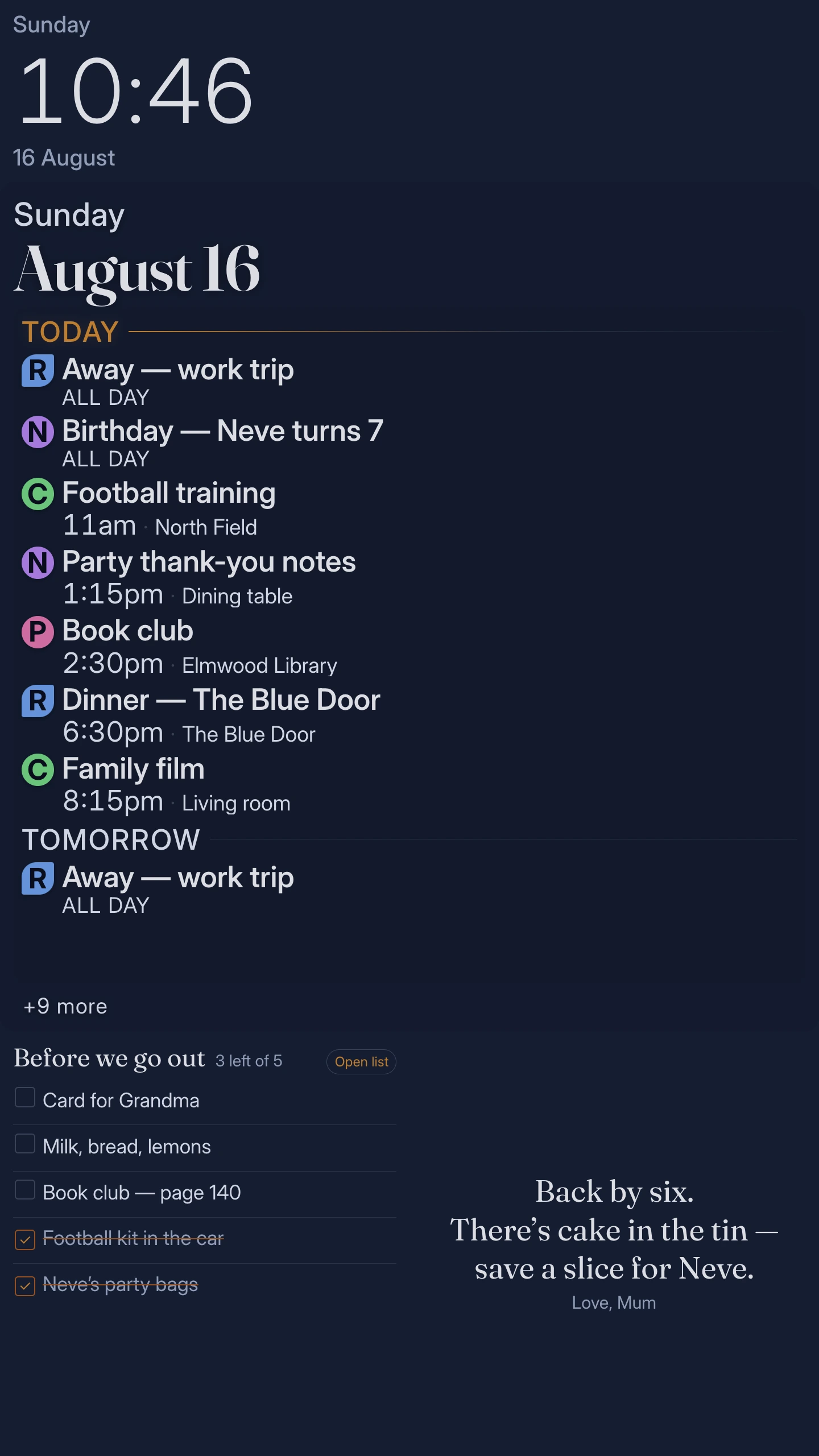
Everything on it is fed by the shared album and the calendars your family already keeps, from the phones they already carry. Your daughter adds a video from another city; a plan shifts on the train home — and the wall has it by the time you next walk past.
Your wall, your way
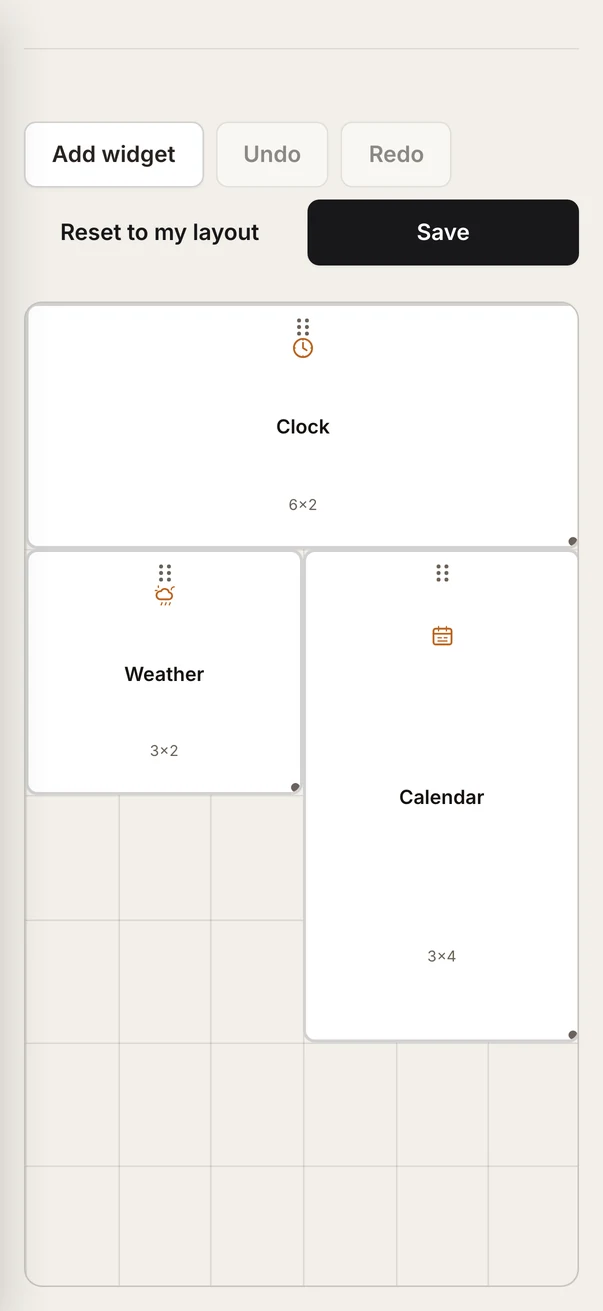
Pick up your phone, drag a photo across the top of the wall, park the cameras at the foot. It snaps to a clean grid as you go, so the wall never looks half-thought.
The day, where everyone sees it
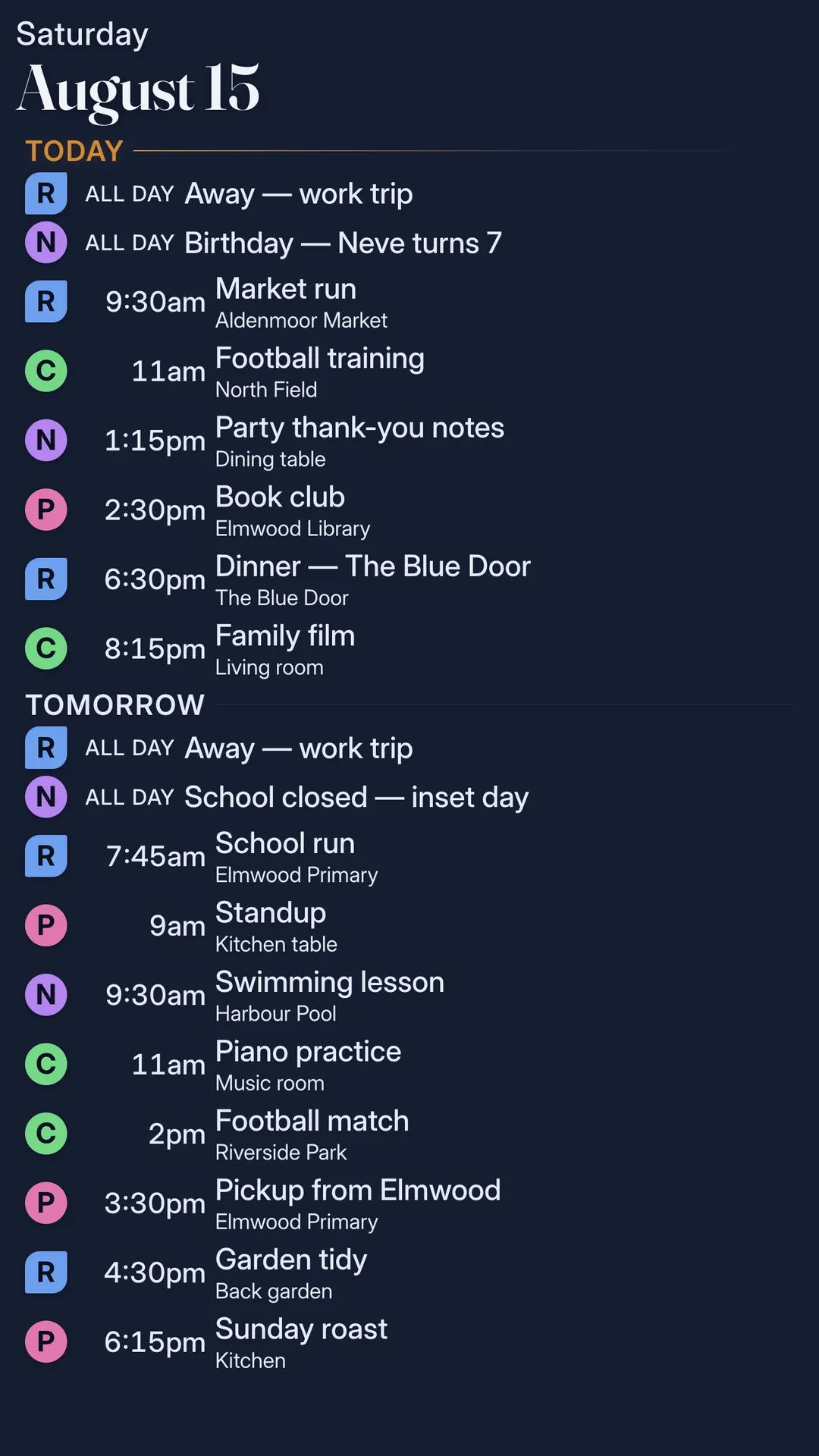
Lucarnia draws in the calendars your family already keeps and lays the day out in the hallway or the kitchen, where everyone walks past.
Each person's events show in their own colour, so one glance tells you who is where.
Google, Apple and Microsoft calendars all offer a feed the wall subscribes to. No new account to tend.
The morning starts with the plan rather than a scramble for it.
Home, at a glance
Not a monitoring station — a glance. Who is at the door, whether the washing will dry, how much of the day you are running on sunshine. The reassuring rhythm of a house that is fine.
Live views from the cameras you already own, read on your own network — a glance to see who has arrived, never a feed for anyone else.
Today at a glance and the days ahead, so the morning starts knowing what the day holds before you step into it.
What your panels are making and your home is using, in real time — a gentle nudge toward running the house on sunshine.
Yours alone
Your home is yours. The faces in your photographs, the videos of your children, the cameras at your doors, where the family will be on Saturday — none of it is anyone's business but your own, and none of it is ours to gather. That is the quiet reason you can hang your family's life on a wall without a second thought.
Read from what you already keep, for the wall and for no one else. None of it is uploaded to us.
Only what keeps it healthy and current: that it is online, which software version it runs, and coarse health such as uptime and spare storage. That is the whole list. There is nowhere in our system for a photo or a camera frame to go.
Every check-in is signed by a key generated on the device that never leaves it. You can switch the check-ins off entirely and everything on the wall keeps working exactly as before — you keep it current yourself.
Installed once
Lucarnia fits a standard recessed box and sits flush with the plaster. Power and network, and it is home.
Point it at the photos, videos, calendars, cameras and solar you already own. It reads them on your own network.
It keeps itself current and runs. Nothing to tend, and nothing private ever leaving the house.
The hardware
Other sizes and resolutions may be offered as the range settles.
Questions people actually ask
Both. Home videos play on the wall alongside your photographs, so a moment plays back as it happened rather than freezing into a single frame.
The ones you already keep — Google, Apple and Microsoft calendars all offer a feed you subscribe the wall to, and the day appears. Recurring events are handled, and each person's events can show in their own colour.
Yes — from your phone. Drag a photo across the top, put the cameras at the bottom, keep the calendar in the middle. The wall snaps to a clean grid as you arrange, and it remembers the layout you settle on so a family member cannot permanently wreck it. Three starter layouts ship with the wall — Family Wall, Homestead and Watchtower — each built around a different centrepiece, if you would rather begin from one.
No. Photos and home videos are read from your own library, and cameras on your own network. None of it is uploaded to us — there is nowhere in our system to store it, by design.
None is required to see your own memories, calendar, cameras, weather or solar. It is your hardware, showing your life.
Coming soon
Reserve early access and we will write to you when Lucarnia is ready for your home.